 WaywardHouse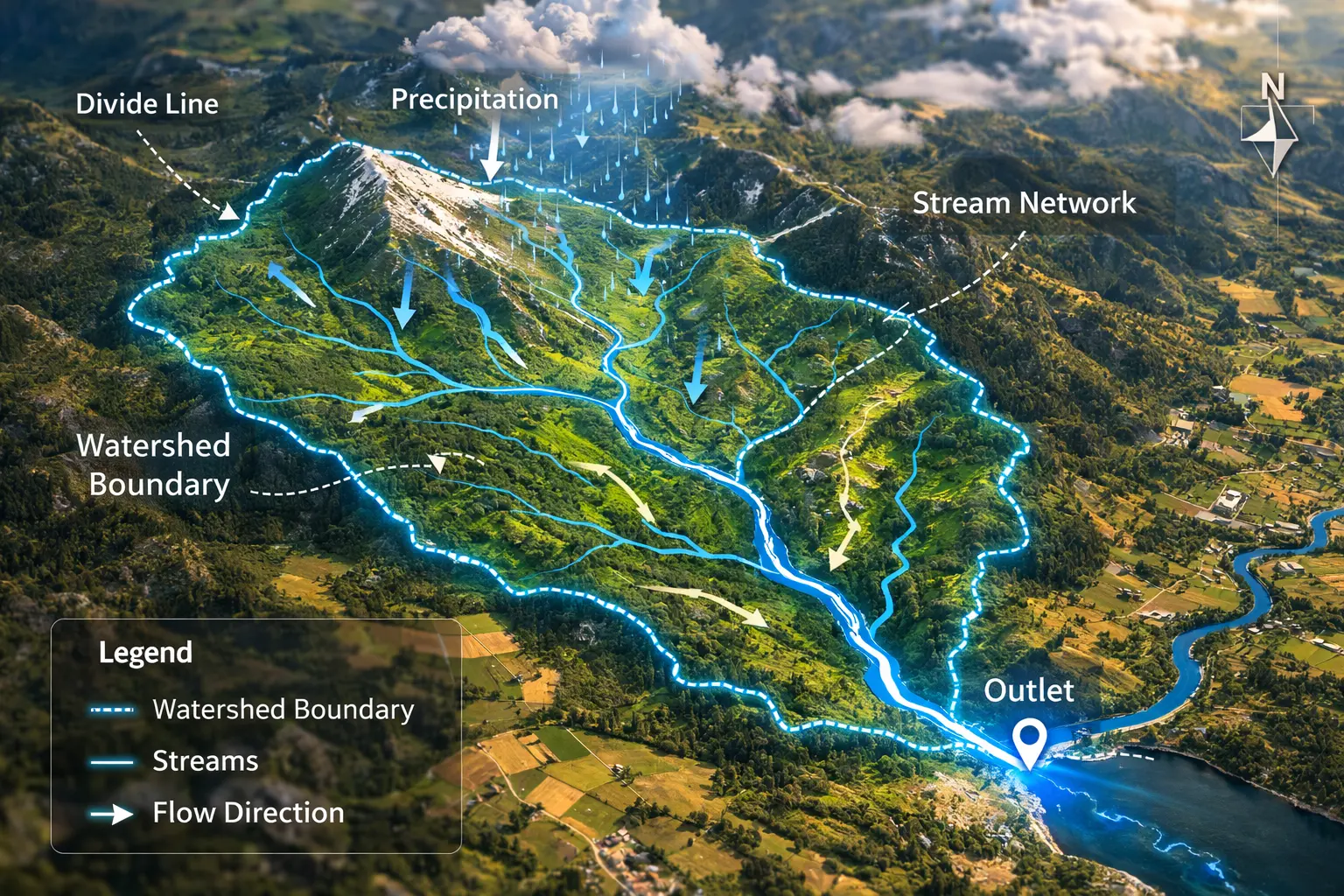
Watershed Delineation and Flow Networks
Where does rainfall flow? Which streams feed this river? What area drains to this outlet? Watershed delineation extracts drainage basins from DEMs by tracing flow direction and accumulation. This model derives the D8 algorithm, implements pour point analysis, and extracts stream networks from terrain.
Prerequisites: flow direction, flow accumulation, basin extraction, graph traversal
1. The Question
If it rains on this mountain, where does the water eventually flow?
Watershed (also called catchment or drainage basin): Area that drains to a common outlet.
Applications:
- Flood prediction: How much area contributes flow to this point?
- Water quality: Which land uses drain into this stream?
- Reservoir planning: What’s the contributing area to a dam site?
- Erosion modelling: Where does sediment originate and accumulate?
- Ecological assessment: Upstream impacts on downstream habitats
The mathematical question: Given a DEM, how do we automatically extract:
- Flow direction from each cell
- Flow accumulation (contributing area)
- Stream network (where flow accumulates)
- Watershed boundaries for any pour point
2. The Conceptual Model
Flow Direction
Water flows downhill along path of steepest descent.
For each cell: Determine which neighbor receives flow.
D8 method (8-direction):
- Examine all 8 neighbors
- Flow to neighbor with steepest descent
- Ties: Use deterministic rule (e.g., choose first in priority order)
Flow direction encoding:
32  64  128
16  [X]   1
 8   4    2
Powers of 2 → single value encodes direction.
Example: Flow to east (right) → direction = 1
Flow Accumulation
For each cell: Count how many upstream cells drain through it.
Algorithm:
- Start with cells having no upstream contributors (ridges)
- Process in topological order (high to low elevation)
- Each cell passes its accumulated flow to its downstream neighbor
Result: Raster where value = number of contributing cells.
High accumulation = stream channels (many cells drain here)
Stream Network Extraction
Threshold accumulation to identify streams:
\[\text{stream} = (\text{accumulation} > T)\]Typical threshold: T = 100-1000 cells (depends on DEM resolution)
Result: Binary raster of stream network.
Watershed Delineation
Pour point: Outlet location where we want to define watershed.
Watershed: All cells that drain to (flow through) pour point.
Algorithm: Trace upslope from pour point, marking all contributing cells.
3. Building the Mathematical Model
D8 Flow Direction
For cell at $(i, j)$ with elevation $z_{i,j}$:
Compute slope to each neighbor:
\[s_n = \frac{z_{i,j} - z_n}{d_n}\]Where:
- $z_n$ = elevation of neighbor
- $d_n$ = distance to neighbor (1 for cardinal, $\sqrt{2}$ for diagonal)
Flow direction:
\[\text{dir}_{i,j} = \arg\max_n(s_n)\](Direction of maximum slope)
Edge cases:
Flat area ($s_n = 0$ for all neighbors):
- Mark as undefined or use flat resolution algorithm
Depression (all neighbors higher):
- Mark as sink or fill depression
Depression Filling
Depressions (local minima) disrupt flow routing.
Fill algorithm:
1. Initialize output DEM = input DEM
2. Set boundary cells to input elevation
3. Set interior cells to very high value
4. Iterate:
   - For each interior cell:
   - New elevation = min(current, max(neighbors) + epsilon)
5. Repeat until convergence
Result: DEM with depressions filled to spill elevation.
Epsilon (small value like 0.01m) ensures flow out of filled areas.
Flow Accumulation Algorithm
Pseudocode:
function flow_accumulation(flow_direction):
    # Initialize
    accumulation = ones(rows, cols)  # Each cell contributes itself

    # Sort cells by elevation (high to low)
    cells = sort_by_elevation_descending(DEM)

    # Process in topological order
    for each cell in cells:
        downstream = get_downstream_cell(cell, flow_direction)
        if downstream exists:
            accumulation[downstream] += accumulation[cell]

    return accumulation
Complexity: $O(n)$ after sorting $O(n \log n)$
Key: Topological ordering ensures upstream cells processed before downstream.
Watershed Extraction
Upslope area from pour point:
function extract_watershed(flow_direction, pour_point):
    watershed = empty_set()
    to_process = {pour_point}

    while to_process not empty:
        cell = to_process.pop()
        watershed.add(cell)

        # Find all neighbors that flow into this cell
        for each neighbor of cell:
            if flow_direction[neighbor] points to cell:
                to_process.add(neighbor)

    return watershed
Result: Set of all cells contributing flow to pour point.
4. Worked Example by Hand
Problem: Compute flow direction and accumulation for this DEM.
Elevation (meters):
      j=0  j=1  j=2  j=3
i=0    50   48   46   44
i=1    52   45   43   42
i=2    54   47   44   40
i=3    56   49   46   38
Use D8 method (8 neighbors).
Solution
Step 1: Flow Direction
Cell (0,1) elevation 48:
Neighbors and slopes:
- (0,0): (48-50)/1 = -2 (uphill, ignore)
- (0,2): (48-46)/1 = 2 ✓
- (1,0): (48-52)/√2 = -2.83 (uphill)
- (1,1): (48-45)/1 = 3 ✓
- (1,2): (48-43)/√2 = 3.54 ✓ Maximum
Flow direction: Southeast diagonal (code = 2)
Cell (1,1) elevation 45:
Neighbors:
- (0,0): -7/√2 (uphill)
- (0,1): -3 (uphill)
- (0,2): 2
- (1,0): -7 (uphill)
- (1,2): 2
- (2,0): -9/√2 (uphill)
- (2,1): -2 (uphill)
- (2,2): 1
Maximum slope: (1,2) or (0,2) both = 2. Choose (1,2) by convention.
Flow direction: East (code = 1)
Continue for all cells…
Flow direction map:
      j=0  j=1  j=2  j=3
i=0     1    2    2    4
i=1     1    1    2    4
i=2     1    1    2    4
i=3     1    1    1    4
(1=E, 2=SE, 4=S)
Step 2: Flow Accumulation
Process cells in descending elevation order:
(3,0) elevation 56: Accumulation = 1, flows to (3,1)
- Update (3,1): 1 + 1 = 2
(2,0) elevation 54: Accumulation = 1, flows to (2,1)
- Update (2,1): 1 + 1 = 2
(1,0) elevation 52: Accumulation = 1, flows to (1,1)
- Update (1,1): 1 + 1 = 2
(0,0) elevation 50: Accumulation = 1, flows to (0,1)
- Update (0,1): 1 + 1 = 2
(3,1) elevation 49: Accumulation = 2, flows to (3,2)
- Update (3,2): 1 + 2 = 3
Continue…
Final accumulation:
      j=0  j=1  j=2  j=3
i=0     1    2    4    8
i=1     1    2    5   10
i=2     1    2    6   13
i=3     1    2    3   16
Cell (3,3): Accumulates flow from all 16 cells (entire grid drains here).
This is the watershed outlet.
5. Computational Implementation
Below is an interactive watershed delineation tool.
Click any cell to extract its watershed
Watershed area: -- cells
Max accumulation: -- cells
Try this:
- Click right panel to set pour point (red dot) and extract watershed (green overlay)
- Simple valley: Water flows down center channel
- Ridge and valleys: Divides drainage into separate basins
- Complex terrain: Multiple drainage patterns
- Stream threshold: Higher = only major streams shown (blue)
- Show flow direction: Red arrows show where each cell drains
- Left: Elevation (lighter = higher)
- Right: Flow accumulation (darker blue = more contributing area)
Key insight: Watershed boundaries follow ridges—all rain inside the green area flows to the red pour point!
6. Interpretation
Flood Risk Assessment
Contributing area = watershed size upstream of point.
Larger watershed → more runoff → higher flood potential
Example: Dam site with 500 km² watershed
- Expected peak flow during storm
- Reservoir sizing for flood control
Water Quality Management
Pollutant sources within watershed affect downstream quality.
Non-point source pollution:
- Agricultural runoff (fertilizers, pesticides)
- Urban stormwater (oil, sediment)
- Septic systems
Delineate watershed → identify all potential sources → prioritize management.
Stream Order Classification
Strahler stream order:
- First-order: Headwater streams (no tributaries)
- Second-order: Junction of two first-order streams
- Nth-order: Junction of two (n-1)-order streams
Higher order = larger river
Application: Stream classification for habitat assessment
Reservoir Yield
Runoff coefficient ($C$):
\[Q = C \times P \times A\]Where:
- $Q$ = runoff volume
- $P$ = precipitation
- $A$ = watershed area
- $C$ = 0.1 (forest) to 0.9 (pavement)
Reservoir inflow = accumulated runoff from watershed
7. What Could Go Wrong?
Flat Areas
D8 fails where no downslope neighbor exists.
Solutions:
1. Impose flow direction:
- Route to nearest definite flow (edge of flat)
2. D-infinity algorithm:
- Allow fractional flow to multiple neighbors
- More realistic but more complex
3. Epsilon slope:
- Add tiny random elevation noise to break ties
Depressions and Sinks
Natural depressions:
- Lakes (real features)
- DEM artifacts (errors)
Consequences:
- Flow accumulation terminates
- Watershed extraction incomplete
Solutions:
Fill depressions:
- Raise elevation to spill point
- Loses lake information
Breach depressions:
- Cut channel through lowest barrier
- Preserves topography better
Hybrid:
- Fill small artifacts, preserve large lakes
DEM Resolution
Coarse DEM misses small drainage features:
- Ditches
- Culverts
- Small channels
Result: Incorrectly routed flow
Solution: Use finest available DEM (1m LiDAR ideal)
Edge Effects
Watershed extends beyond DEM boundary:
Flow direction undefined at edges.
Solution:
- Use larger DEM extent
- Or explicitly model boundary conditions
8. Extension: D-Infinity Algorithm
D8 limitation: Flow restricted to 8 directions (multiples of 45°).
D-infinity: Flow in any direction.
Method:
- Fit plane to 3×3 neighborhood
- Compute steepest descent direction (continuous)
- Apportion flow to two nearest neighbors
Flow partitioning:
If steepest descent at angle $\theta$ between neighbors $A$ and $B$:
\[f_A = \frac{\theta_B - \theta}{\theta_B - \theta_A}\] \[f_B = 1 - f_A\]Result: More realistic flow divergence
Cost: Higher computational complexity
9. Math Refresher: Topological Sorting
Definition
Topological sort: Linear ordering of directed acyclic graph (DAG) such that for every edge $u \to v$, $u$ comes before $v$ in the ordering.
Application to Flow
Flow network = DAG where edges point downstream.
Topological order = process cells from high to low elevation.
Ensures: When processing cell, all upstream contributors already processed.
Kahn’s Algorithm
L = empty list (topological order)
S = set of nodes with no incoming edges

while S not empty:
    remove node n from S
    add n to L
    for each node m with edge n → m:
        remove edge n → m
        if m has no other incoming edges:
            add m to S
For flow: Start with ridge cells (no upstream), process downhill.
Elevation Sorting
Simpler for DEMs: Sort by elevation instead of graph structure.
Works because: Higher elevation → upstream in flow network.
Summary
- Watershed (drainage basin) = area that drains to a common outlet
- D8 algorithm computes flow direction from each cell to steepest neighbor
- Flow accumulation counts upstream contributing cells by processing in elevation order
- Stream network extracted by thresholding flow accumulation (>100-1000 cells)
- Watershed delineation traces upslope from pour point to find all contributors
- Depression filling removes artificial sinks before flow routing
- Applications: Flood risk, water quality, reservoir planning, erosion modelling
- Challenges: Flat areas, depressions, DEM resolution, edge effects
- D-infinity extends to continuous flow direction (more realistic, more complex)
- Critical for hydrological modelling and environmental management